Improve a draft
Start rough. Leave with a clear request.
Pick an instruction such as “Make it clearer.” Add a one-time nudge to guide the rewrite, then take the result back to your work.
 PrompterDownload
For macOS
Turn a rough thought into a clear prompt with the AI agent you already use. Open Prompter from your menu bar, refine your wording, and get back to work.
Free download · Apple Silicon · macOS 14+

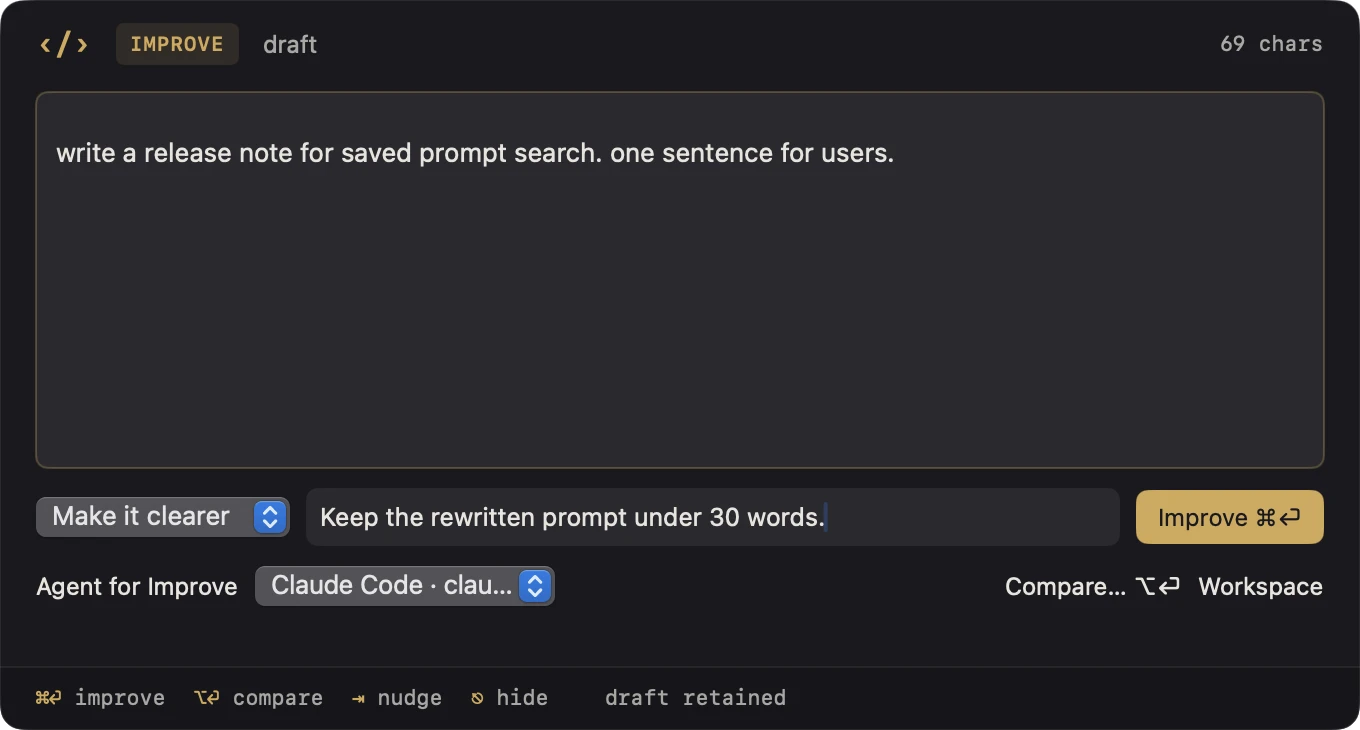
Watch a rough release-note request become a focused prompt in 30 seconds. The demo uses Claude Code and a nudge to keep the revision under 30 words.
Open Improve and enter “write a release note for saved prompt search. one sentence for users.” Select “Make it clearer,” then add “Keep the rewritten prompt under 30 words.”
Choose Improve. Claude Code returns the following 24-word prompt, and Prompter copies it to the clipboard.
Write a one-sentence, user-facing release note announcing saved prompt search. Use plain, benefit-focused language that explains users can now quickly find their saved prompts.
Use the palette for a quick rewrite. Open the workspace when you want to compare results or work with a repository.
Improve a draft
Pick an instruction such as “Make it clearer.” Add a one-time nudge to guide the rewrite, then take the result back to your work.
Save your prompts
Save a prompt to your library and find it by name the next time you open the palette.
Compare rewrites
Send one prompt to up to three configured agents. Compare their answers before choosing what to use.
Ask a repository
Pick a folder from your repo library, ask a question, and inspect the cited files. Pin a default for your next question.
Prompt Improve supports compatible builds of Claude Code, Codex CLI and Grok Build. Prompter includes Clink. Install and sign in to the native agent separately. You can edit and save prompts without connecting one.
The disk image is signed and notarized. Its SHA-256 checksum is eea0b979a1ce7a080ed0321afe62120fe8d7d8b6cc9505c109c27e777569fab5.